Newsroom Schema Done Right: The Technical Setup for an AI-Trusted Hub
:Schema markup is the difference between a newsroom AI engines trust and one they ignore. Copy-pasteable JSON-LD patterns for all three required schema types — Organization (with sameAs), Person (with worksFor), and Article (with all required fields) — plus an 8-item validation checklist, field-by-field explanations of the five most commonly neglected fields, and the five most common implementation errors with specific fixes. Extends "The Owned Newsroom" with the full technical layer.
By Hayden Hollis
Schema markup is the difference between a newsroom that AI engines trust and a newsroom they ignore. The content can be identical — the same articles, the same authors, the same dates — but a newsroom with properly implemented structured data gives AI retrieval systems the machine-readable metadata they need to classify, evaluate, and cite its content. A newsroom without it forces the model to infer that metadata from unstructured text, which it does less accurately and with less confidence.
This article is a technical setup guide for newsroom schema. It extends the architectural framework described in "The Owned Newsroom" with the specific implementation details that most teams miss — copy-pasteable schema patterns, field-by-field explanations, validation steps, and a setup checklist that covers the full structured data layer for an AI-trusted brand hub.
The guide assumes you have a CMS or web platform where you can edit page-level JSON-LD. If your platform does not support custom JSON-LD, this guide will identify the specific capability gaps you need to address before the schema layer can function correctly.
5×
approximate citation lift when a newsroom adds proper Article schema with author attribution — the single highest-ROI technical fix
3
schema types required for a complete newsroom setup: Organization, Person, and Article (or NewsArticle)
0
press release syndication sites in the top AI citation sources — your owned newsroom with schema is a stronger citation asset
The Three Schema Types Your Newsroom Needs
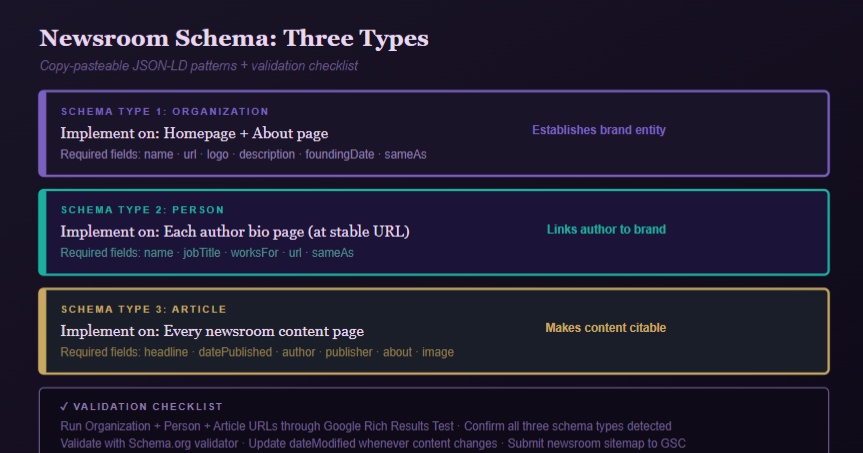
A complete newsroom schema setup requires three interlocking schema types, each implemented at the appropriate page level. They build on each other: the Organization schema establishes the brand entity; the Person schema establishes the author entities; the Article schema connects each piece of content to both. Missing any one of the three leaves gaps the model fills with inference — which is less accurate than structured data.
Schema Type 1 — Organization. Implemented on your homepage and About page. Establishes your brand as a known entity with consistent attributes. Required fields: name, url, logo, description, foundingDate, sameAs.
Schema Type 2 — Person. Implemented on each author bio page. Establishes each writer and executive as a named expert entity linked to the brand. Required fields: name, jobTitle, worksFor, url, sameAs.
Schema Type 3 — Article or NewsArticle. Implemented on every newsroom content page. Connects the content to its author entity and publisher entity with full temporal metadata. Required fields: headline, datePublished, dateModified, author, publisher, image, about.
Schema Pattern 1 — Organization Schema
Place this JSON-LD in a <script type="application/ld+json"> tag in the <head> of your homepage and About page. Replace all bracketed values with your actual data.
Critical fields explained:
sameAs — This is the most underused field in brand schema. It is an array of URLs pointing to every authoritative external representation of your brand entity. Each URL tells the model: "this profile and my homepage describe the same entity." Include LinkedIn, Crunchbase, Wikipedia (if you have a page), G2/Capterra, and any industry-specific directory where your brand has a verified presence. The more consistent the sameAs connections, the stronger the entity disambiguation signal.
description — This must be identical to your canonical brand descriptor used on LinkedIn, Crunchbase, G2, and every other external surface. Inconsistency here is the most common entity-building error — different descriptions on different surfaces force the model to average toward vagueness rather than a confident, specific entity node.
Schema Pattern 2 — Person Schema (Author Bio Pages)
Place this JSON-LD in the <head> of each author bio page. Each named author who publishes on your newsroom needs their own bio page at a stable URL.
worksFor — This field creates the explicit link between the person entity and the organization entity. It is how the model connects a founder byline in a third-party publication (where the author is named) back to the brand entity on your domain. Without this field, the model treats the author and the brand as potentially unrelated entities.
Author bio page requirements — The bio page itself (not just the schema) must include: a professional photo, a substantive bio paragraph with specific credentials, a list of recent bylines (with external links), and external verification links (LinkedIn, professional profile). The schema tells the model what the page contains; the page content itself is what the model evaluates for E-E-A-T compliance.
Schema Pattern 3 — Article Schema (Every Newsroom Page)
Place this JSON-LD in the <head> of every article, press release, and newsroom post. This is the most important schema implementation — it is what converts newsroom content from text into a structured citation asset.
The Setup Checklist: Validate Before You Publish
☐ Organization schema implemented on homepage and About page. Run both URLs through Google's Rich Results Test. Confirm that the Organization type is detected and that name, url, logo, description, and sameAs are all populated without validation errors.
☐ Person schema implemented on every author bio page. Confirm that each bio page has Person schema with worksFor linked to the Organization entity. The author URL in the Article schema must exactly match the URL of the bio page where the Person schema lives.
☐ Article schema implemented on every newsroom content page. Run five representative newsroom URLs through the Rich Results Test. Confirm that Article type is detected on each. Common failures: missing image (required), mismatched headline and H1, absent dateModified, author URL pointing to a 404 page.
☐ dateModified updated to match actual last-edit date. This field should not be static. Build a process — either automated through your CMS or manual — to update dateModified whenever article content is changed. A newsroom where all articles show the same dateModified as datePublished signals to the retrieval system that content is never updated, which triggers a freshness discount.
☐ sameAs arrays populated on Organization and Person schemas. At minimum: LinkedIn, Crunchbase, and G2 for the Organization. LinkedIn for every Person. Wikipedia and Twitter/X where applicable. Each additional sameAs URL strengthens the entity disambiguation signal.
☐ Canonical URLs implemented and consistent. Every newsroom page must have a canonical URL tag pointing to itself (or to the preferred version if the page has multiple URL patterns). Canonical URL in the schema's mainEntityOfPage must match the canonical URL tag in the HTML head. Mismatches tell the model that different representations of the same page are separate entities — diluting the citation signal.
☐ Newsroom sitemap submitted to Google Search Console. The schema is useless if the pages are not indexed. Confirm that your newsroom URLs appear in Google Search Console's Coverage report with "Submitted and indexed" status. Pages that are not indexed are not in the retrieval corpus.
☐ Article schema validated with Schema.org validator in addition to Rich Results Test. Google's Rich Results Test validates for Google-specific requirements. Schema.org's validator (validator.schema.org) checks for broader structural correctness. Run both. Fix any errors flagged by either tool.
Common Implementation Errors and How to Fix Them
Error 1 — Author URL in Article schema points to a nonexistent page. This is the most common implementation failure. The author URL must resolve to a real, indexable page with Person schema. If the bio page does not exist, create it before implementing Article schema. Fix: build author bio pages at stable URLs, implement Person schema, then update Article schema author URLs to point to those pages.
Error 2 — Headline in schema does not match H1 on the page. Google's guidelines specify that the headline field should match the article's actual headline. A mismatch signals inconsistency between the structured data and the page content — which reduces the schema's trustworthiness as a metadata source. Fix: use a template or CMS automation that pulls the H1 directly into the headline field.
Error 3 — Logo ImageObject is too small or has incorrect dimensions. Google's Article schema requires a logo image at minimum 60px tall and 600px wide. A logo that fails this requirement causes the publisher field to fail validation, which prevents the Article from being recognized as a full structured Article by the retrieval system. Fix: provide a horizontal logo variant at the required minimum dimensions.
Error 4 — sameAs URLs point to redirects or nonexistent profiles. Every URL in a sameAs array must resolve to a live, accessible profile page. Broken sameAs URLs do not strengthen entity disambiguation — they introduce errors the model must resolve. Fix: audit all sameAs URLs quarterly and update any that have changed or broken.
Error 5 — Schema implemented via Google Tag Manager with delayed loading. JSON-LD schema loaded via GTM fires after the initial HTML parse, which can cause some crawlers to miss it. For schema that must be reliably detected, implement JSON-LD directly in the page's HTML head, not through GTM. Fix: move schema from GTM to server-side HTML injection through your CMS template.
Further Reading · Curated by the DropPR Editorial Desk
Get Your Schema Done Right — Once
Full newsroom schema implementation — validated, tested, and ready for AI citation.
DropPR's technical team implements the complete three-schema newsroom setup — Organization, Person, and Article — validates against both Google Rich Results Test and Schema.org validator, and pairs it with an editorial placement that immediately begins building the corroboration your newsroom schema supports.
Newsroom Schema + First Editorial Placement Stack
Organization schema with full sameAs implementation ($400 value)
Person schema for up to 3 named authors/executives ($300 value)
Article schema template for CMS integration + validation ($350 value)
Rich Results Test + Schema.org validator audit (10 pages) ($250 value)
First editorial placement linking to newsroom anchor ($1,200 value)
Total stack value: $2,500 Charter pricing from $99.
No subscription. No retainer. Pay per placement.
Data Sources Referenced
Aumcore (2026) · 5× citation lift from Article schema and author entity implementation.
Google Developers · Article, Organization, and Person structured data specifications and validation requirements.
Schema.org · Article, Organization, Person, and sameAs type references.
Frase (2026) · GEO Playbook; structured data as entry condition for AI citation eligibility.
BrightEdge (Q1 2026) · Zero press release syndication sites among top AI citation sources for commercial queries.
DropPR analysis (2026) · Three-schema newsroom requirement; common implementation errors and fixes.
Hayden Hollis
Head of Growth Marketing · DropPR.ai
Hayden Hollis writes about content distribution, digital PR, SEO, AI search, and creator marketing. His work focuses on how brands and creators can extend the reach of their content beyond social media and improve visibility across search engines, news publishers, and AI-powered discovery platforms. He regularly covers strategies related to earned media, audience growth, authority building, and the evolving role of AI in online discovery.